

Stugots
-
Posts
193 -
Joined
-
Last visited
-
Days Won
30
Posts posted by Stugots
-
-
We’re thrilled to announce that Windows for Rockchip now supports the BuzzTV PowerStation 6!
With UEFI support introduced in the latest release https://github.com/edk2-porting/edk2-rk3588/releases ,the PowerStation 6 takes another step forward in versatility and functionality.
Mainline Linux Support Highlights
Tested with Fedora Workstation 41, the following peripherals are confirmed to work seamlessly:
- USB
- PCIe (NVME)
- SD and eMMC storage
- Wi-Fi and Bluetooth (requires specific firmware files from CoreELEC)
- Ethernet
- HDMI (requires enabling "Force UEFI GOP Display" in settings or kernel 6.13-rc3+ for native support)
- GPU Acceleration (native HDMI support in kernel 6.13 required for hardware rendering)
- IR Receiver
- Status LEDs
- RTC (Real-Time Clock)
Known Limitations:
Some features are still under development or not yet supported, including:
- Audio (HDMI & SPDIF)
- Resume from suspend
For more details, check the latest development updates in the mainline status notes.
Windows Boot Testing
We’ve also successfully booted Windows from an SD card on the PowerStation 6! This is an exciting milestone, opening up new possibilities for users seeking to explore Windows on ARM platforms.
Stay tuned for more updates as we continue to work with the community and developers to enhance support and unleash the full potential of the BuzzTV PowerStation 6.

Disclaimer:
The support for Windows and Linux on the BuzzTV PowerStation 6 is the result of third-party development efforts and is not directly affiliated with BuzzTV. While using these features will not void your device warranty, please note that BuzzTV does not assume any responsibility or liability for any potential issues, malfunctions, or failures arising from the use of third-party software or modifications.Proceed with these configurations at your own discretion and risk.
-
 7
7
-
 1
1
-
We're gathering ideas from the BuzzTV community to create a wishlist of new features and improvements for the BuzzTV6 app
Your feedback is crucial in helping us understand what features are most important to you. By sharing your ideas, you directly influence the development of BuzzTV6, ensuring it meets the needs and expectations of our community.
Join us in shaping the future of BuzzTV6! Share your suggestions today and help us create an even better viewing experience.
-
8
-
-
New Logo vs Old Logo. Which one you like better?
The old logo version attached

-
here's the link to the catalog https://buzztv.com/pdf-catalogue/
-
powerstation p6
-
2
-
-
L1
PowerStation P6
X5 SS

-
1
-
-
The spam software is updated. hopefully this fixes the issues
Thx
-
5
-
-
a poll for the people on this thread https://stbtalk.com/index.php?/topic/8682-poll-for-bt400-remote-users/
-
For those who hate the BT-400 remote because its missing buttons , if you could add 5 more buttons what would they be?
-
Remotes are very subjective, so we have a few versions to choose from.
For those who love more buttons and shortcuts, the IR-200, BT-250, and ARQ200/220/250 will be your best option. These remotes have a smart learning feature; you can manually learn your TV remote codes on your buzztv remote. These remotes do not support OTA updates, and only ARQ200/220/250 have backlights.
For those who mainly use D-Pad, Volumes, and Channel buttons, the BT-400 is a perfect choice. This remote is designed in Korea and has advanced Smart Set technology that auto-detects the 10 most popular TV brands for Source Pairing (Power, Volume, and Source buttons). Other notable features are OTA updates and bright backlights.
Different styles, different sizes, and various amounts of buttons. Take your pick!
-
2
-
-
this post shouldn't be in the news and announcements section.
-
2 hours ago, Tato said:
The new update has changed the way my X5 starts.
Power on initiates a restart with the initial splash screen. My VPN doesn't start with power on as before, but requires a manual start from the home screen.
I preferred the previous power on function and hope to see it return in a future update.
you can manually change the power definition in the settings menu. although its recommended to keep it the default way.
-
On 1/1/2021 at 11:28 PM, Benfica said:
Whats the price range ? Anyone knows ?
Pricing hasn't been announced yet. It will be slightly more than XRS4500 MAX pricing.
-
On 12/24/2020 at 12:44 AM, montell said:
not really, I think 3900 is a top quality box, I only wish they made a new version of 3900 that one could still change mac accounts on, but my question is does anyone think that Team Buzz will keep updating 3900 for few more years?
XPL3900 is using buzztv2 application.
X4000 series/ vidsticks / essentials / is using buzztv4 application and will get buzztv5 update when it becomes available.
You cannot change your mac address on buzztv4/5 however XC API (Streaming Line ) is supported. Instead of Mac address, this methods is username/password and allows you to use multiple devices.
-
On 12/28/2020 at 11:02 AM, Lantzco said:
Are we any closer to an ETA on the 4900, I'm in the market for a new box...
release date Feb 1st 2021.
-
1
-
-
On 12/1/2020 at 6:29 PM, Torontorocko said:
Why do they keep coming out with new boxes and not fixing the issues on the existing boxes (XRS4000)?
So Frustrating!!!
welcome to the technology world. we support existing models and come out with new models this is part of the evolution.
-
I hate to be the bearer of bad news, this model is delayed until Q1 2021. XRS4900 is launching with buzzTV5 application and the software is not ready yet
-
1
-
-
On 10/15/2020 at 11:41 PM, montell said:
Hello, can I change mac accounts on this E1 android box?
thanks
Use XC API (username/password) it allows you to share on multiple devices without the need of changing the mac address
-
of 2020

-
Limited Supply Shipping by Air . ETA is early December
-
The problem is finally resolved. Unplug the power and re-plug the power. Now your able to take the update
-
1
-
-
-
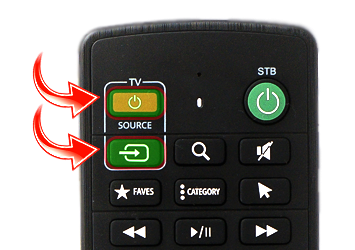
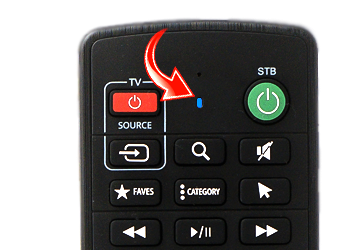
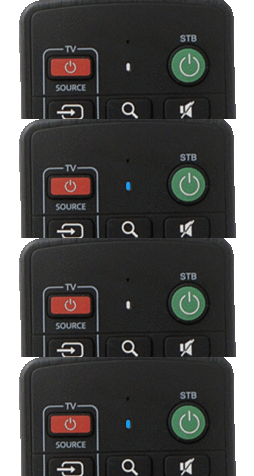
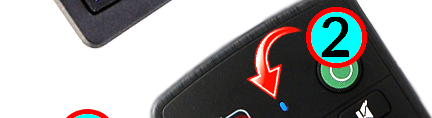
1. Long Press [ TV Power + Source ] keys for 3 seconds
Until you see the blue light LED turns Solid Blue.
2. Press the key to be programmed. Example [ TV Power ]
The Blue LED begins to blink.
3. Aim the Remote to the front of the TV Remote( distance less then 3CM )
1) Press Power button on Buzztv Remote
2) Press Power button on your TV remote.
3 ) You will see that Light will blink 3 times
4. Press Power on Buzztv TV remote to sync the code.
Now test your Buzztv remote with your TV to make sure the power works.
Also you can same type of steps for Source button on buzztv remote.
-
 1
1
-
-
11 hours ago, Buddy said:
Hello, I just received and set up my XRS4500 Box today. It will not accept my credentials for my Url's and passwords. I keep getting an error that it cannot load portal for both of them.
Kind regards.
Buddy please post this question in the proper section and not hijack the wrong threads https://stbtalk.com/index.php?/forum/48-xr4500-xrs4500/






New YouTube Review
in PowerStation
Posted
Hi Joe, thanks for posting this and keeping it constructive.
On the security patch date, yes, the P6 is currently on an older Android security patch level. That’s a valid callout and we agree it should be more current. I’ve already flagged this internally and we’re pushing to improve the security patch cadence on P6 going forward.
On Netflix, Disney and home theater style Plex use, it comes down to certification and licensing. P6 is Android 13 AOSP, not Google TV certified Android TV. The TV versions of apps like Netflix and Disney require certification and DRM compliance to run properly and to support features like 4K, Dolby Vision and Dolby Atmos.
Also worth noting, Google does not certify every chipset. As powerful as RK3588 is, it cannot be Google TV certified, which is why P6 remains an AOSP performance and IPTV focused device.
On the Triple M video being taken down, we don’t have any official information from YouTube or the creator, so I don’t want to speculate.
Appreciate you bringing it up.
Cheers