


dishuser
-
Posts
4,478 -
Joined
-
Last visited
-
Days Won
372
Posts posted by dishuser
-
-
8 hours ago, Lovebuzztv said:
buzztv and not international lol
sorry, I thought you were translating on your own like it does to me on my phone.
was learning French so you wouldn't need to translate for me anymore
no I was using google
I only enough french,italian and spanish to get by when talking to people in person
-
11 minutes ago, checklu said:
yes
check tv settings/timer
-
12 minutes ago, checklu said:
i have no scheduled events... any other help wouldbe great..
does your box and tv turn on/off together with same power button?
-
please translate your posts since this an english speaking site
if I wanted answers on a spanish speaking site I wouldn't ask my questions in english

-
 2
2
-
 1
1
-
-
all my batteries that are used frequently are rechargeable
best investment I made in a long time
-
1
-
-
keep in mind back light kills battery life
-
all my bt remotes light up great
can see all the buttons in the dark
-
1
-
-
29 minutes ago, Rover1 said:
I am having the same problem.
Each time there is an update my buzz will not load my sub.
I get cannot load portal: forbidden.
reboot modem/router
-
4 minutes ago, allaboutbuzz said:
Only thing that would cause this really would be a scheduled recording
what about a box that gets the popup like you do when you long press power button at same time every night?
-
did you try the other video player in buzztv app?
-
after mounting it did you format it?
-
10 minutes ago, MilMascaras said:
How do you reload the server? By hitting refresh? Cause I did that.
that's how you do it
-
what about RTMP?
-
13 minutes ago, Nunzio D said:
a nice update would have a backup and restore in the tv guide If you ever use Tivimate they have that feature so you can load your iptv provider + it downloads your guide plus your favorites I just a nice option.
buzztv app already does that
my favourites are already loaded once connected to server along with epg
why mess with something that isn't broken?
-
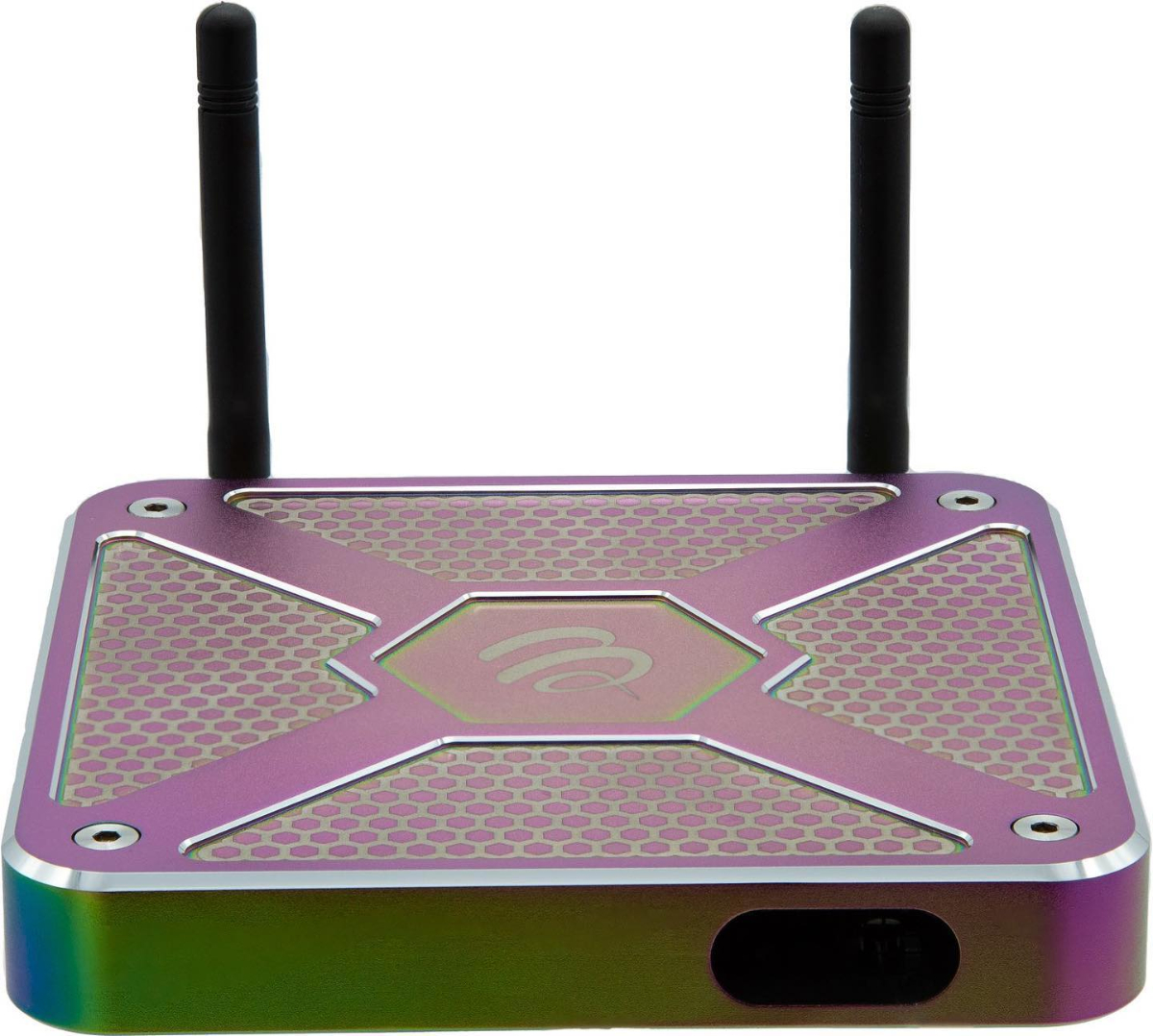
The X5 Special edition comes in the exclusive Chameleon colourway. Experience the speed and stability of Wi-Fi 6, built into the X5 Special Edition. Wi-Fi 6 is the most modern Wi-Fi Spec. It allows for greater speeds, lower latency delays, and increased efficiency when using multiple devices on your network. The X5 uses the latest generation Amlogic Quad Core processor that is maxed out with 4GB of DDR4 RAM which gives you lightning-fast navigation.
Running on Android 11™, apps are now optimized to allow you to merge your existing solutions into one box for a true “All-In-One” solution.
Available with 128GB of internal storage, the X5 has plenty of space to download your favorite content.
Our X5 comes standard with our brand-new BT-400 Smart Remote that allows you to easily control your TV’s Power button, Volume control and TV input source.
Built Inside the X5 is our new Buzztv Smart Remote App. With this app you can automatically pair your TV to the BT-400 Smart Remote, turn the backlight on and off and program the four-color keys on the remote for quick access to your favorite apps.
The BuzzTV 5 app is the next generation of streaming. Optimized is an understatement in the evolution of BuzzTV 5 OS. Years of continuous improvement and innovation are woven in its DNA.
Our proprietary “No Hassle PVR+” allows you to set scheduled programming to record the shows you want to watch.
 Wi-Fi 6 - The latest generation of Wi-Fi, now built into the X5. Enjoy faster speeds and stronger connections with Wi-Fi 6.
Special Color - The latest generation of Wi-Fi, now built into the X5. Enjoy faster speeds and stronger connections with Wi-Fi 6.
2T 2R - Dual external antennas now provide 1.5 dB gain which boosts the TX power to the router by 50 percent.
AMLogic 905x4 - This latest chipset from AMLogic is 10% faster in operation speed compared to 905x3.
Android 11 / AV1 - Improved speed and support for AV1 codec.
BT-400 Remote - New for 2022 is our most advanced remote; The Bt-400 is a Bluetooth smart remote with an auto TV learning feature.
BuzzTV Smart Remote App - Control your backlight, Auto TV Source pairing, and color button programming through our brand new BuzzTV Smart Remote App.
Bluetooth Range - Between the built-in Bluetooth on the PCBA, and the BT-400 remote, connectivity and response are significantly better.
BuzzTV 5 App - Is standard.
PVR+ - Allows the box to wake up and record a program by itself
TV App Store / TV App version - True 4K streaming on most supported streaming services and offers TV Optimized apps.
Bluetooth 5 - Most up-to-date version of Bluetooth for the best connection to the BT-400 remote.
All Aluminum Construction - Our all-new design is a Triple Anodized Aluminum shell used for thermal efficiency and provides an elevated look and feel.
Gigabit LAN Port - The Gigabit LAN port allows for the fastest and most stable internet over wired connections.
Wi-Fi 6 - The latest generation of Wi-Fi, now built into the X5. Enjoy faster speeds and stronger connections with Wi-Fi 6.
Special Color - The latest generation of Wi-Fi, now built into the X5. Enjoy faster speeds and stronger connections with Wi-Fi 6.
2T 2R - Dual external antennas now provide 1.5 dB gain which boosts the TX power to the router by 50 percent.
AMLogic 905x4 - This latest chipset from AMLogic is 10% faster in operation speed compared to 905x3.
Android 11 / AV1 - Improved speed and support for AV1 codec.
BT-400 Remote - New for 2022 is our most advanced remote; The Bt-400 is a Bluetooth smart remote with an auto TV learning feature.
BuzzTV Smart Remote App - Control your backlight, Auto TV Source pairing, and color button programming through our brand new BuzzTV Smart Remote App.
Bluetooth Range - Between the built-in Bluetooth on the PCBA, and the BT-400 remote, connectivity and response are significantly better.
BuzzTV 5 App - Is standard.
PVR+ - Allows the box to wake up and record a program by itself
TV App Store / TV App version - True 4K streaming on most supported streaming services and offers TV Optimized apps.
Bluetooth 5 - Most up-to-date version of Bluetooth for the best connection to the BT-400 remote.
All Aluminum Construction - Our all-new design is a Triple Anodized Aluminum shell used for thermal efficiency and provides an elevated look and feel.
Gigabit LAN Port - The Gigabit LAN port allows for the fastest and most stable internet over wired connections.

-
4
-
-
32 minutes ago, TonyC said:
Did anyone else get another update? Fixing bugs ect.
Thanks
go to the link I gave you a few days ago
-
2 hours ago, Pauly said:
Yes, and I want to see how it goes for the other guy as well! why do u have issue with this?
you never quoted anyone so who are asking?
you never posted your experience about new update
I would say that's a problem
-
11 minutes ago, Pauly said:
Let us know how It goes, I'm curious as well to see how the new firmware works out for you!
are you for real?
you posted you took the update 2 days ago
-
1 hour ago, Pauly said:
yeah, read the thread title
Quoteare you a post whore?

-
1 hour ago, Alex said:
My x5 on 5.0 775
read thread title
-
19 minutes ago, rdw33 said:
I wanted the xrs4500 but it was sold out.
so what did you buy?
-
15 minutes ago, rdw33 said:
I'm pissed off at Buzz! Any recommendations on another make and model.
you want recommendations for another make on the buzztv support site?lol
the xrs4500 is a great model
your issue is with remote
by the way backlight kills battery life pretty fast
-
3 minutes ago, rdw33 said:
Thank you so much for clarifying what I had suspected. I'm going to see if I have a case for returning it.
if you can swap it for the bt-200
-
12 minutes ago, rdw33 said:
Is it on this site or the internet?
it's on your box
home page/settings/buzztv utilities
-
1
-
Télécommande BT-250
in BT 250
Posted
forgot the word know..lol